Back
Blog
News
GitHub Audit in EDAMAME Hub: A Low-Friction First Step to Zero Trust for GitHub

Frank Lyonnet
Your GitHub organization is a control plane: repos, tokens, integrations, and IP boundaries. Security teams need to know who did what, where it came from, and how risky it was—often before you have every laptop enrolled in a device program. GitHub Audit in EDAMAME Hub is built for that first mile: connect GitHub, pick a lookback window, and get a scored report you can act on—no device enrollment required.
A practical on-ramp to Zero Trust for GitHub
Our long-term vision is Zero Trust for GitHub Enterprise: continuous identity, device, and context checks on every Git interaction. That’s the right end state for many teams—but not everyone starts there. GitHub Audit is deliberately low friction: install the EDAMAME GitHub App (read-only org audit log access), run an audit, and review scores, maps, actors, and classified events in one place. It’s an easy way to baseline risk and build the case for deeper enforcement.
What you get in the report
After you start a run (typical lookbacks: 7, 30, 90, or 180 days—30 days is a sensible default), Hub processes the job asynchronously. Large orgs may need several minutes; allow up to ~15 minutes before treating a run as stuck, then start a new audit if needed.
When the report is ready, you’ll see:
Audit score (0–100) with labels such as Good, Needs attention, or At risk
Human vs non-human activity, unique actors, and—when your org enables it—unique IPs
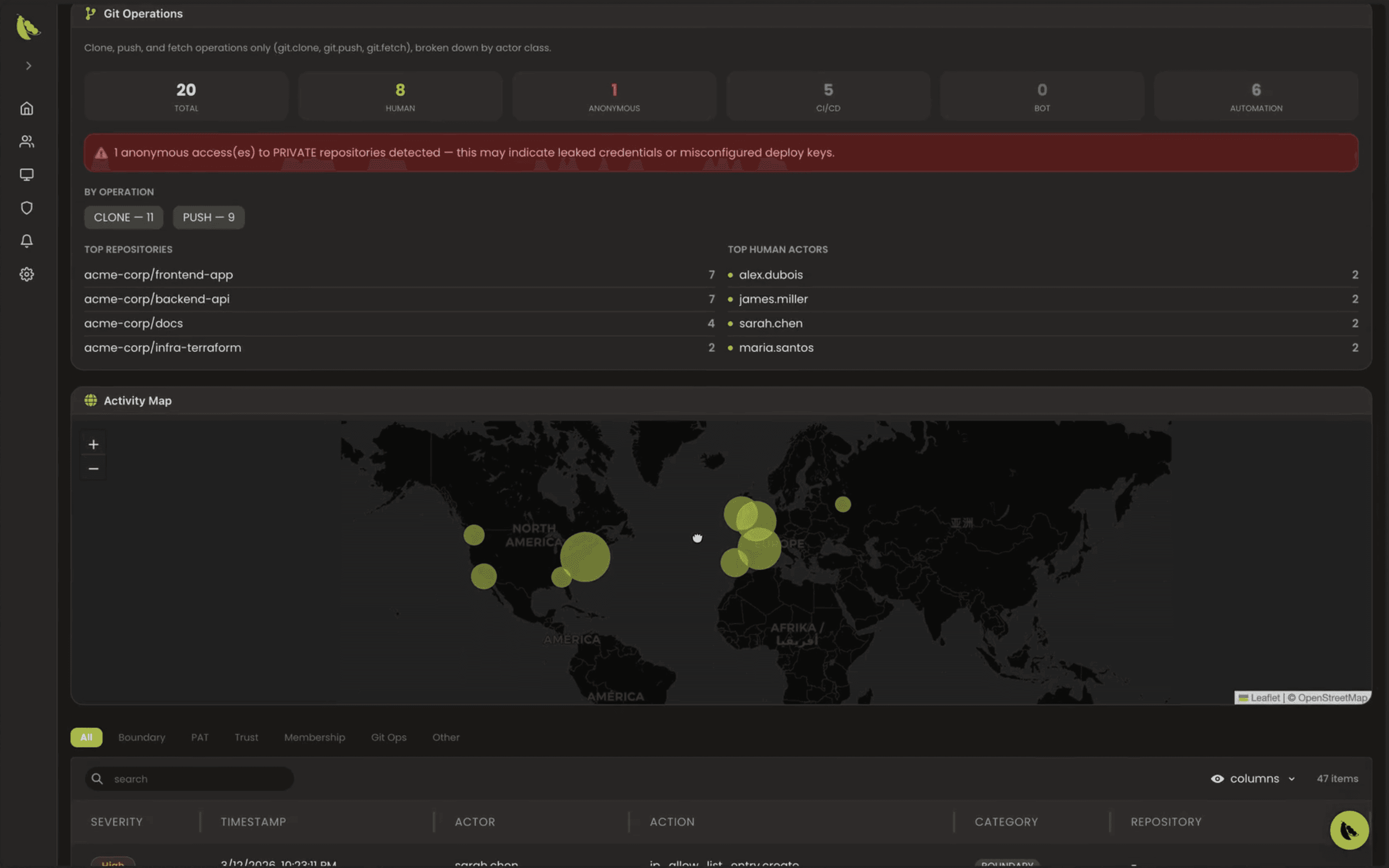
Clickable factor badges (e.g. boundary changes, PAT-related signals, high-risk patterns like anonymous Git access to private repos)
Severity distribution and filters by category: Boundary, PAT, Trust, Membership, Git Ops, and more
Top actors, IP and geography views, and a breakdown of Git operations (clone, push, fetch) by actor class
A searchable, paginated event table for investigation
Treat anonymous access to private repositories as high priority until ruled out—it’s often a sign of leaked credentials or misconfiguration.
Public preview: IP addresses in GitHub’s audit log
Richer IP and map data depends on your GitHub org settings. GitHub’s display of IP addresses in the organization audit log is in public preview and subject to change; when enabled, it helps Hub show where activity originated. See GitHub’s documentation: Displaying IP addresses in the audit log for your organization.
Availability and requirements
GitHub Audit in EDAMAME Hub is available at no extra cost to existing and new EDAMAME customers as part of the product experience.
This capability is aimed at organizations on GitHub Enterprise (org audit log and enterprise-grade controls are central to the workflow).
Where to start in Hub
Connect GitHub: Settings → Integrations → GitHub → Connect (complete the EDAMAME GitHub App installation for your org).
Run an audit: choose lookback and start; or use the guided flow Audit your GitHub organization from setup.
Latest run: View last audit under Integrations, or open the audit route for your domain in Hub.
Technical background: data comes from the GitHub Organization Audit Log API; GitHub retains org audit events for 180 days. More detail on the feature and UI is in our GitHub Audit documentation (edamame_hub).
Next step: close the token loophole
Visibility is step one. When you’re ready to enforce continuous verification on every GitHub request—not just at SSO login—explore Zero Trust for GitHub Enterprise and try EDAMAME Hub. GitHub Audit helps you see the problem; Zero Trust helps you stop it at the layer where tokens and keys actually operate.
Frank Lyonnet
Share this post

